Guide · Oct 2026
Keep It Cool: Why Equipment Racks Need Cooling and the Right Location
Heat is the most common and most avoidable cause of AV and network failures we see. Here is where a rack should live, what happens when it gets too hot, and how ventilation or a dedicated mini split keeps a system reliable.
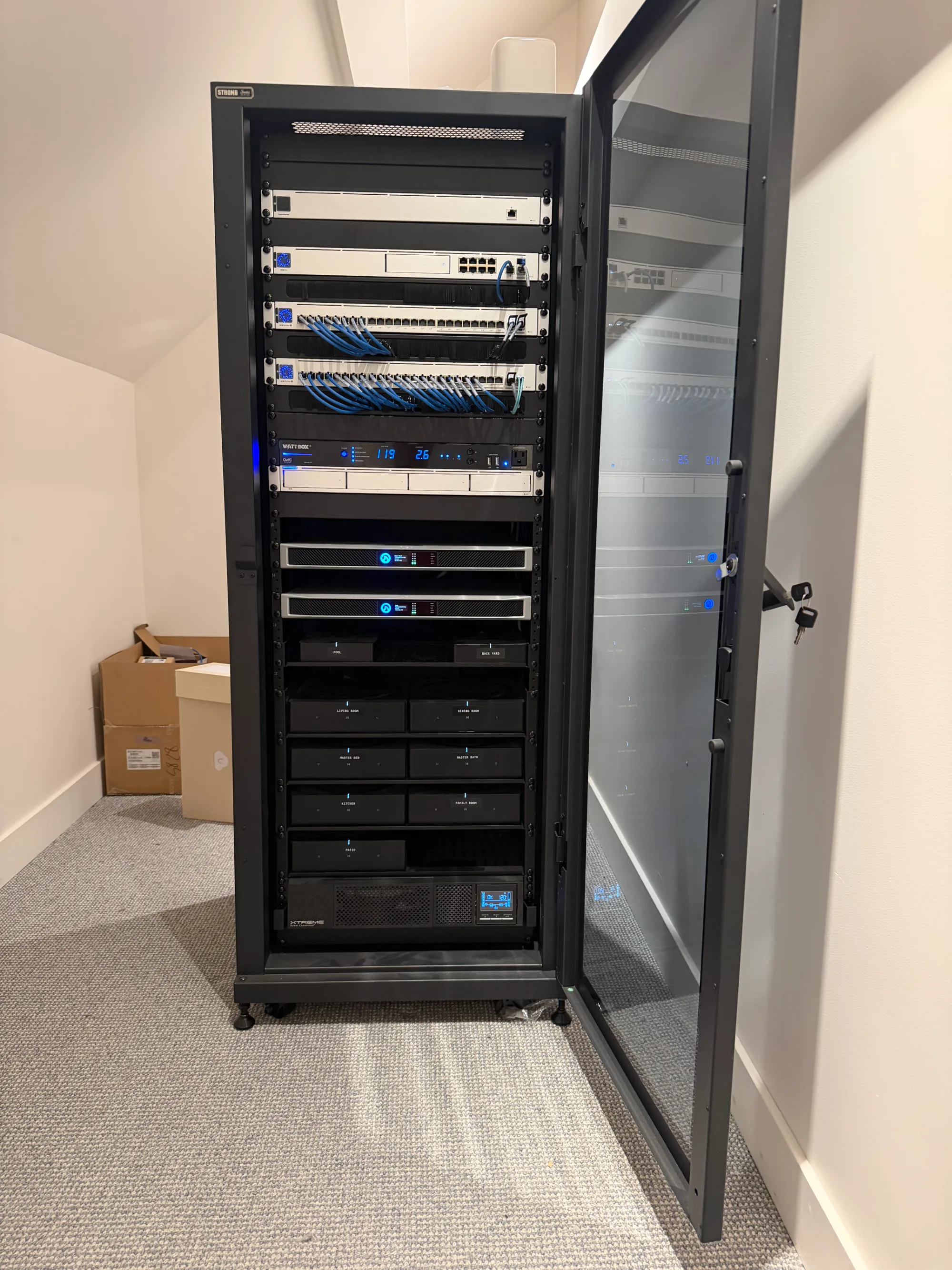
Every smart home and every commercial system we build has a heart: the equipment rack. It holds the network, the control processor, the amplifiers, the camera recorder, the streaming sources and the power protection that keep everything else running. When that rack is happy, nobody thinks about it. When it overheats, everything in the building starts acting strange at once.
Heat is the most common and most avoidable cause of equipment failure we see. It is also the part of a project that gets cut most often, because cooling a closet does not look like much on a floor plan. This post explains why it matters, where a rack should and should not go, and what a properly cooled equipment room looks like.
Why heat kills electronics
Everything in a rack turns electricity into heat. An amplifier driving speakers in eight rooms, a network switch powering cameras and wireless access points, a recorder writing video around the clock: all of it is warm to the touch for a reason. Put enough of that equipment in a small, closed space and the temperature climbs until it reaches whatever the room can get rid of. In a closet with no airflow, that point is far higher than the equipment was built for.
Electronics do not usually fail the moment they get hot. They degrade. Capacitors dry out faster, cooling fans wear out, hard drives in recorders run hot and fail early, and solder joints fatigue as they heat and cool every day. A widely used rule of thumb in electronics design is that every 10°C (about 18°F) rise in operating temperature roughly cuts the expected life of parts like electrolytic capacitors in half. A rack that sits at 95°F instead of 75°F is quietly using up its lifespan.
What actually happens when a rack gets too hot
Overheating rarely shows up as a dramatic failure. It shows up as a system that feels unreliable, and the symptoms are easy to blame on something else:
- Amplifiers go into protect mode. Music cuts out in the middle of a party, then comes back a few minutes later once the amp cools down.
- The network drops. Switches and routers throttle or reboot, Wi-Fi goes down, and every connected device in the house loses its connection at once.
- Control systems freeze. Keypads and touch panels stop responding, scenes do not run, and the app cannot find the system.
- Cameras stop recording. Recorders overheat and drives fail, which you usually discover only when you need footage that is not there.
- Streaming and video sources lock up. The TV shows a black screen or the streamer needs to be unplugged and plugged back in.
- Equipment dies early. Components that should last many years need replacing after a few, often in the middle of summer.
Here on the Central Coast, the pattern is predictable. Systems run fine through a mild spring, then the first real heat wave of late summer or fall arrives and the service calls start. Inland homes in the Santa Ynez Valley and North County see it first, but a sunny closet in Santa Barbara or Montecito can do the same thing.
Choosing the right location for a rack
The best cooling plan starts with the location. Before we design anything else, we look at where the equipment will live and what that space will do to it in August.
Places to avoid:
- Garages and attics. These spaces follow the outdoor temperature and often run far hotter. A garage that feels fine in the morning can be well over 100°F by afternoon.
- Closets on a west or south wall. Afternoon sun heats the wall itself, and the closet behind it becomes an oven.
- Rooms shared with heat sources. Water heaters, furnaces, laundry machines and pool equipment add heat, and anything with plumbing adds the risk of water on the electronics.
- Small, sealed closets and under-stair spaces. With no supply or return air, heat has nowhere to go.
- Cabinetry with closed doors and no ventilation path. A beautiful millwork cabinet can be the hottest place in the house.
What a good location has: it is inside the conditioned part of the home, away from exterior walls that take direct sun, central enough to keep cable runs reasonable, large enough to pull the rack away from the wall for front and rear access, and planned with a way to remove heat from day one. It also needs dedicated electrical circuits and a clear path for cooling equipment, which is far easier to plan before the drywall goes up than after.
We run into this on almost every design
We will be direct about this, because it is one of the most common conversations we have. Equipment space is usually the last thing allocated on a set of plans. The rack ends up in whatever closet is left over, often a small one with no HVAC supply or return. When we recommend ventilation or dedicated cooling, it is sometimes seen as an extra that can be skipped, or it conflicts with the aesthetic of the room, or the HVAC contractor is already gone.
We understand the pressure. But we have also been called back to the results more times than we can count: the system that reboots itself every afternoon in September, the amplifier that keeps shutting off during the one weekend the family has guests, the camera recorder that quietly stopped recording weeks ago, and equipment replaced years before it should have been. In almost every case, the fix after the fact costs more and looks worse than planning for it at the start would have.
That is why cooling is part of our design from the first walkthrough, not an afterthought. It is also why we will push back, politely and with reasons, when a plan puts a full rack of equipment in a sealed closet.
The bare minimum: ventilation
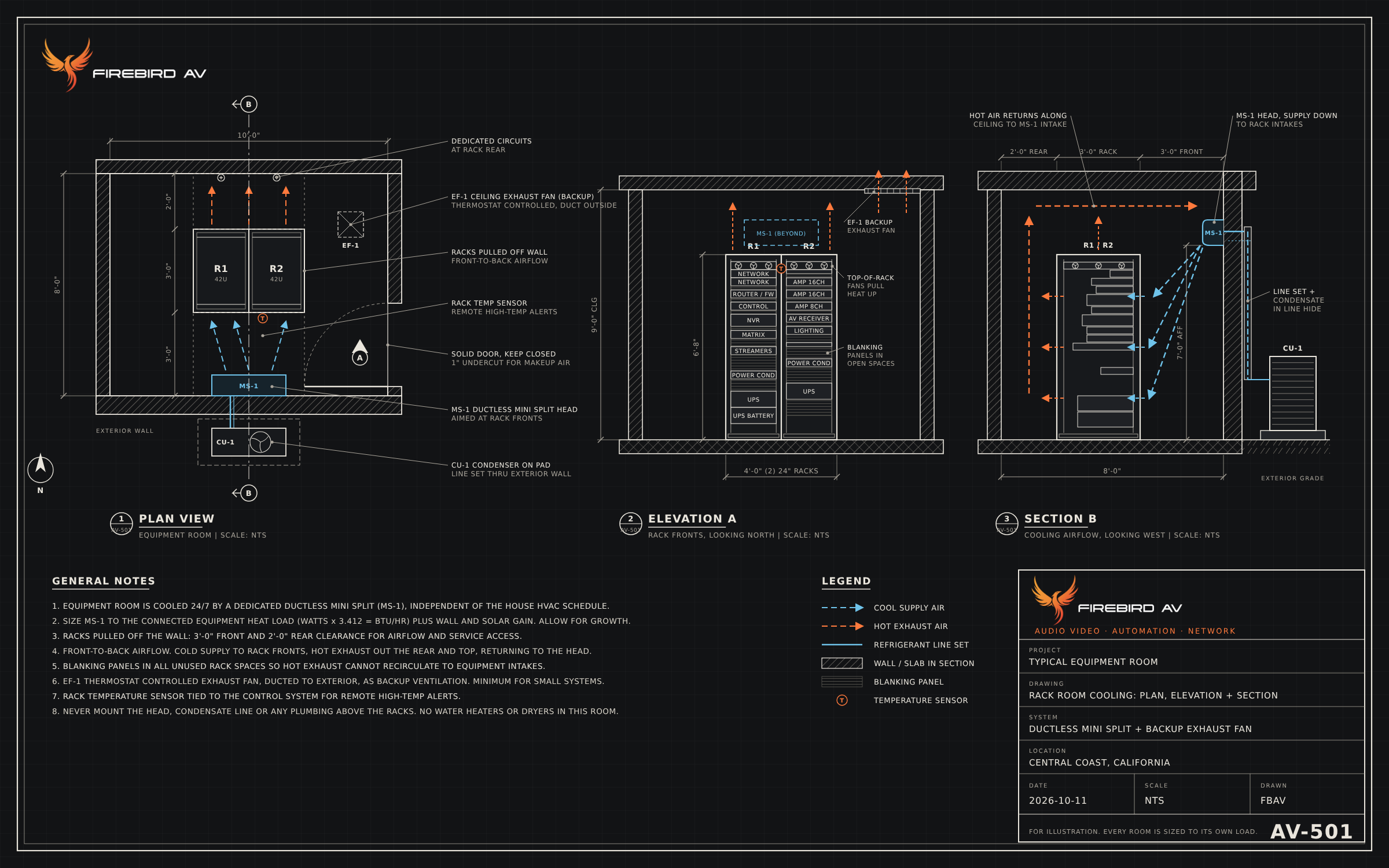
Every rack needs a way to move hot air out of the space. At the very least, that means a ventilation fan. For smaller systems in a closet, a thermostat-controlled exhaust fan that pulls hot air out of the top of the space, paired with a path for cooler air to come in low (a door undercut, a louvered door or a transfer grille), can keep temperatures in a safe range. Inside the rack, fans at the top help pull heat up and out, and blanking panels in unused spaces stop hot exhaust from circling back into the front of the equipment.
Ventilation only works if the air it brings in is cooler than the air it removes. That is why it is a minimum, not a solution for every case. A fan in a hot garage just moves hot air around.
Larger systems: a dedicated room with a mini split
On larger installations, a full rack (or several) of amplifiers, networking, control and surveillance equipment produces more heat than a fan can deal with. For those projects we recommend a dedicated equipment room cooled by its own ductless mini split.
A mini split makes sense here for a few reasons:
- It runs independently of the house. Home HVAC systems set back when the family is away or the windows are open. Equipment generates heat 24 hours a day, every day, and needs cooling that does not shut off.
- It can be sized to the actual heat load. Equipment power draw converts directly to heat (every watt is about 3.4 BTU per hour), so we can calculate what the room needs and work with your HVAC contractor to size the unit with room to grow.
- It creates a controlled airflow pattern. Cool air goes to the front of the racks where equipment draws it in, hot air comes out the back and top, and it returns to the unit along the ceiling.
The drawing at the top of this article shows the layout we aim for: racks pulled off the wall with clear space in front and behind, the mini split head on the wall facing the rack fronts, the condenser outside with the line set routed through the exterior wall, a thermostat-controlled exhaust fan as a backup in case the mini split ever faults, and a temperature sensor in the rack that can send an alert before a problem becomes an outage. Just as important is what is not in the room: no water heater, no plumbing, and no condensate line running over the equipment.
How much more reliable a cooled system is
The difference is not subtle. A properly cooled rack is one of the biggest factors in whether a system feels dependable or frustrating. When the equipment room stays cool, the music does not cut out, the network stays up, the cameras keep recording, and the equipment lasts the way it was designed to. The racks we have built with proper cooling are the ones we rarely hear about, which is exactly the point.
It also makes service easier and less disruptive. A rack with room to work around it, clear airflow and a temperature sensor that can raise an alert means a problem gets caught early, before it turns into an outage.
Planning a project?
If you are building or remodeling, the best time to plan for your equipment is before framing, when the location, power and cooling can all be designed together. If you already have a system that misbehaves every time the weather warms up, heat is one of the first things we check. Either way, we are happy to take a look and tell you what your space needs.